Introduction
This guide was created within the HPC.NRW project using example configurations from FAU Erlangen and Ruhr University Bochum.
The guide is kept up to date on a best-effort basis. For problems, corrections, or change requests, please open an issue in the GitHub repository.
What is ClusterCockpit?
ClusterCockpit is a modern open-source solution for job-specific monitoring and analysis of HPC clusters.
Its goal is to provide administrators and users with clear insights into utilization, efficiency, and cluster health by combining job data, performance and energy metrics, and a range of additional statistics.
ClusterCockpit is developed at Friedrich-Alexander University Erlangen-Nuremberg (FAU) and released under an open-source license.
The official project site with more resources, demos, downloads, and documentation is available at:
https://clustercockpit.org
A key part of any ClusterCockpit setup is the monitoring of low-level hardware metrics such as FLOPS and memory bandwidth.
LIKWID is one of the metric collectors used for this purpose. It is developed primarily at FAU and provides local tools for analyzing and benchmarking hardware performance.
ClusterCockpit components
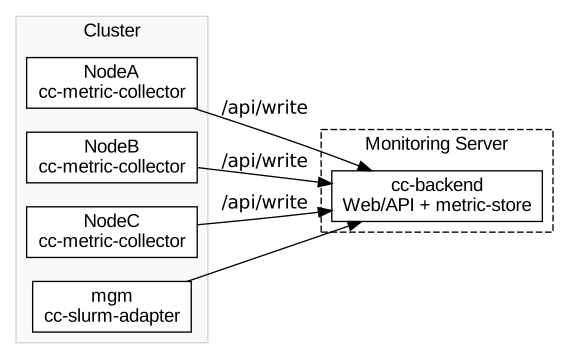
ClusterCockpit consists of multiple components that communicate with each other and run on different systems within the cluster infrastructure:
-
cc-backend:
Central server component with web frontend, API, database access, and integrated metric store.
Hosts the UI, user management, configuration logic, and temporary time-series storage. -
cc-metric-collector:
Agent that is installed on the compute nodes.
Collects metrics such as CPU load, memory, network, I/O, etc., and forwards them to thecc-backendwrite API. -
cc-slurm-adapter:
Component that integrates with SLURM so that job metadata (user, project, allocations) appear inside ClusterCockpit.
Typical setup
A common deployment looks like this:
- Dedicated monitoring server that runs
cc-backend. - Compute nodes that each run
cc-metric-collector. - SLURM management node that additionally runs
cc-slurm-adapter.
What can ClusterCockpit monitor?
The platform is modular and can ingest, among others, the following metrics (depending on hardware and configuration):
- CPU load and utilization
- Memory usage
- Network and filesystem performance
- Special performance metrics such as FLOPS and memory bandwidth (via LIKWID)
- GPU and InfiniBand metrics
- Custom/user-defined metrics
Who is this guide for?
This guide targets system administrators who want to install, configure, and operate ClusterCockpit in their own HPC environment.
You should be familiar with:
- Basic Linux administration
- SSH access to the target systems
- Fundamental cluster concepts (SLURM, management vs. compute nodes)
How is this guide structured?
The manual walks you step by step through the entire process from system preparation and installation to the first start and advanced configuration and operations.
Practical examples and scripts help you reach a working monitoring setup as quickly as possible.